
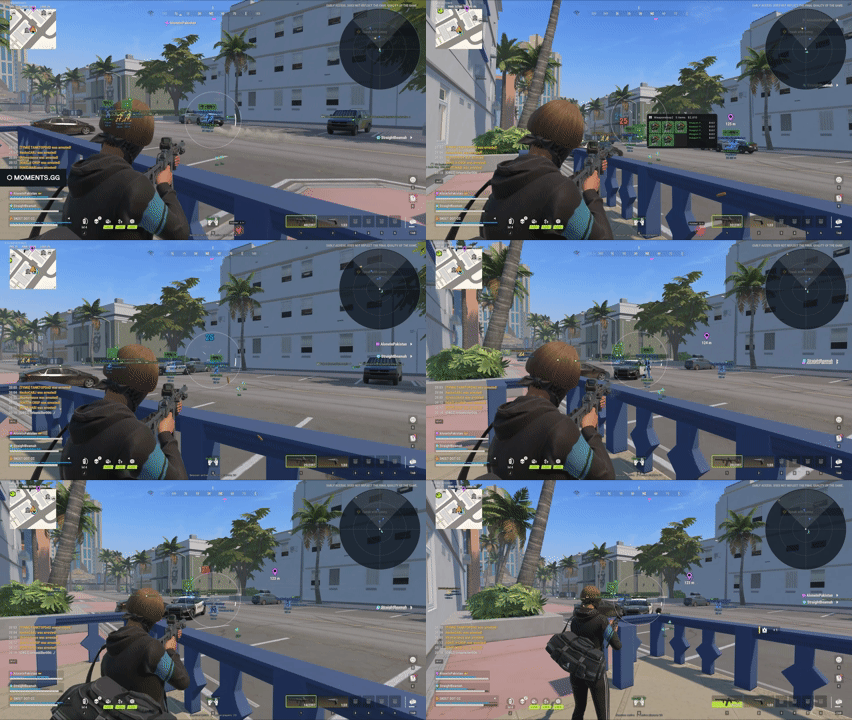
Aimbot
General
- Aimbot Turns the aimbot on or off
- Hold RMB to aim Only aims while the right mouse button is held
- Aim mode How aiming is applied, e.g. Memory (rotation write)
- Smooth aim Moves onto the target gradually instead of snapping
- Smoothing Strength of the smoothing; higher is slower and more natural
- Backtrack Lets shots register against a target's recent past positions
- Rapid fire Fires faster than the weapon's normal rate
- Auto fire Shoots automatically when a target is locked
Targeting
- Aim bone The body part to aim at, e.g. Head
- Target selection How a target is chosen, e.g. Closest to crosshair
- Acquisition FOV Angle around the crosshair where targets are picked up
- Maximum distance Targets further away than this are ignored
- Target lock Stays on the current target until it's lost instead of switching
- Skip downed Ignores downed players
- Skip arrested Ignores arrested players
- Skip team Ignores teammates
- Skip targets in vehicles Ignores players inside vehicles
Target Roles
- Police Targets police
- Robber Targets robbers
- Civilian Targets civilians
- Settler Targets settlers
- Prisoner Targets prisoners
- Hub Targets hub players
- Clan Battle Targets clan battle players
- Other Targets any other role
Visuals
- FOV circle Draws the acquisition FOV as a circle on screen
- Aim line Draws a line to the current target
Player ESP
Display
- Enable player ESP Turns player ESP on or off
- Box style Box drawn around each player, or Off
- Skeleton Draws each player's skeleton
- Backtrack skeleton Shows the past position that backtrack would hit
- Name Shows player names
- Clan tag Shows clan tags next to names
- Held item Shows the name of the item each player is holding
- Item colour by rarity Colours the held-item label by rarity
- Held item icon Shows an icon for the held item
- Role Shows each player's role
- Status Shows status flags such as downed or arrested
- Distance Shows distance to each player
- Category Shows the player's category
- Health bar Draws a health bar beside each player
- Snap lines Draws lines from your screen to each player
- Nearest marker Highlights the closest player
- View direction Shows which way each player is looking
- Maximum distance Players further away than this aren't drawn
- Skeleton distance Skeletons are only drawn within this range
- Text scale at range How much labels shrink at long range
Warning
- Target warning Warns you when a player is aiming or facing at you
- Line of sight only Only warns when the player can actually see you
- Ignore harmless Skips players who can't hurt you
- Include team Also warns about teammates
- Role and distance Shows the threat's role and distance in the warning
- Range Maximum distance a player can be to trigger a warning
- Facing angle How directly a player must face you to count
- Size Size of the warning icon
- Edge inset How far from the screen edge warning icons sit
- Flash rate How fast the warning flashes
Roles That Can Hurt You
- Police Counts police as a threat
- Robber Counts robbers as a threat
- Civilian Counts civilians as a threat
- Settler Counts settlers as a threat
- Prisoner Counts prisoners as a threat
- Hub Counts hub players as a threat
- Clan Battle Counts clan battle players as a threat
- Other Counts any other role as a threat
Filters
- Players Shows real players
- NPCs Shows NPCs
- Cops Shows cops
- Robbers Shows robbers
- Other roles Shows every other role
- Friends / clan Shows friends and clanmates
- Hide dead Hides dead players
Visibility
- Visibility check Draws players out of line of sight differently
- Hidden player alpha Opacity of players out of line of sight
Colors
- Role colors Colours ESP by player role
- Police Colour for police
- Robber Colour for robbers
- Civilian Colour for civilians
- Team / NPC colors override Uses separate colours for teammates and NPCs
- Default box Box colour when role colours are off
- Name Name label colour
- Item Held-item label colour
- Item: common / uncommon Colour for common and uncommon items
- Item: rare / epic Colour for rare and epic items
- Item: legendary / exotic Colour for legendary and exotic items
- Default skeleton Skeleton colour when role colours are off
- Health Health bar colour
- Flags Status flag colour
- Backtrack Backtrack skeleton colour
- Nearest marker Nearest-player marker colour
- View direction View direction line colour
Entity ESP
General
- Enable entity ESP Turns world-object ESP on or off
- Maximum distance Objects further away than this aren't drawn
Types
- Containers / drawers Shows lootable containers and drawers
- Loot nodes Shows loot spawn nodes
- Loose loot Shows items lying on the ground
- Loot bags Shows dropped loot bags
- Cargo Shows cargo
- Vehicles Shows vehicles
- Grenades Shows live grenades
- Laundry tables Shows laundry tables
Labels
- Hide empty / taken Hides containers that are empty or already looted
- Hide worthless Hides low-value loot
- Show distance Shows distance on each label
- Show state Shows an object's state, e.g. locked or open
- Grenade timer Shows time until a grenade explodes
- Grenade trajectory Draws a grenade's predicted path
Items
- Item icons Shows icons instead of text for items
- Icon size Size of item icons
- Flip icons Mirrors item icons
- Declutter Merges overlapping labels into cards
- Card size Size of merged item cards
- Merge gap Screen distance at which labels get merged
- Group within World distance at which items get grouped together
- Detail range Full item details are only shown within this range
- Look-at radius Screen radius around the crosshair that expands a card
- Grid cell Grid size used for decluttering
- Smallest stack card Minimum size of a stacked card
- Group by building Groups loot by the building it's in
- Car boots Shows what's in vehicle boots
Bases
- Base ESP Shows player bases
- Base range Bases further away than this aren't shown
- Detail card Shows a detail card for the base you're looking at
- Look-at angle How close to a base you must look to open its card
Radar
General
- Radar Turns the radar overlay on or off
- Range World distance the radar covers
- Size Size of the radar on screen
- Dot size Size of the player dots
- Reset position Moves the radar back to its default spot
Display
- Rotate with view Rotates the radar as you turn
- Cross lines Draws centre crosshair lines
- Range rings Draws distance rings
- View cone Draws your field of view on the radar
- Player view direction Shows which way other players are facing
- Pin out-of-range to edge Keeps players beyond range at the radar's edge
- Names Shows player names on the radar
- Fade hidden players Dims players out of line of sight
Colors
- Background Radar background colour
- Border Radar border colour
- Center Colour of your own centre marker
- Lines / rings Colour of the cross lines and range rings
- View cone View cone colour
Misc
Tweaks
- Battle mode Switches to a combat-focused preset
- Instant inventory reveal Reveals inventories without the search delay
HUD
- Local health Shows your own health on the overlay
- Session status Shows the session status line
- Crosshair Draws a custom crosshair
Unload
- Unload Paragon Removes the tool from the game completely
Plug and play
Features
- INSTANT SETUP WITH NO REQUIREMENTS!!
- If this was a car it would drive on cooking oil.
Paragon Rob Run Internal (Instant setup) FAQ
On the free version of EAC this cheat will likely last forever without bans!
Reviews
No reviews yet. Verified buyers can be the first to leave one.
Write a review
Reviews are open to confirmed buyers, one per purchase, from the device the order was placed on. No account needed.