
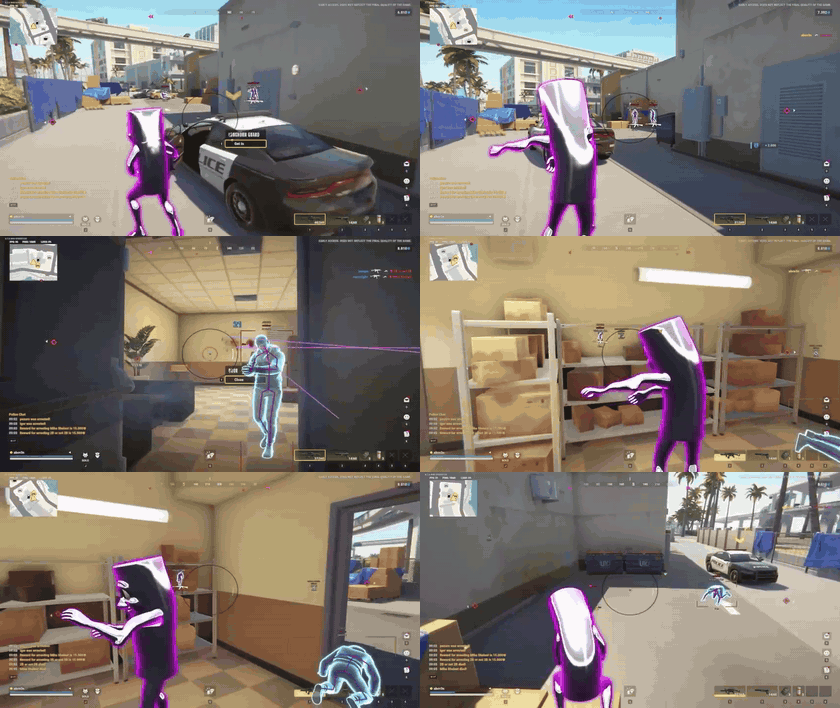
Aimbot & Targeting
- Normal Aimbot Standard aim assistance that moves your crosshair onto targets
- Silent Aim Hits the target without visibly moving your camera
- Adjustable Silent Aim Hitchance How often silent aim shots are redirected to the target
- Movement Prediction Leads moving targets
- Auto Shoot with Silent Aim and Visibility Check Fires automatically when a visible target is in silent aim range
- Custom Aim Keybind Set your own key to activate aiming
- Player Role and Team Filters Choose which roles and teams can be targeted
- Aim Bone Selection The body part to aim at
- Visibility Check Only targets players in line of sight
- Ignore Knocked Players Skips downed players
- Keep Target Stays on the current target until it's lost instead of switching
- Aimbot Smoothing How gradually the aim moves onto the target; higher is slower and more natural
- Aimbot Humanization Adds natural variation so aiming looks less robotic
- Aimbot Deadzone Small area around the target where the aim stops adjusting
- Adjustable Aim Radius Size of the area around the crosshair where targets are picked up
- Maximum Aim Distance Targets further away than this are ignored
- Customizable FOV Circle Draws the aim radius as a circle on screen
- Dynamic FOV Circle Resizes the FOV circle with your zoom
- Customizable Target Line Draws a line to the current target
- Target Line Only While Active Only shows the target line while you're aiming
Detailed Player Visuals
- Skeleton ESP Draws each player's skeleton
- Box ESP Draws a box around each player
- Player Names Shows player names
- Distance ESP Shows distance to each player
- Clan Tags Shows clan tags next to names
- Held Item ESP Shows the item each player is holding
- Held Item Rarity Colors Colours the held-item label by rarity
- Reloading Indicator Shows when a player is reloading
- In-Vehicle Indicator Shows when a player is in a vehicle
- Armor Indicator Shows each player's armour
- Crouching Indicator Shows when a player is crouching
- Sprinting Indicator Shows when a player is sprinting
- Knocked Player Indicator Shows when a player is downed
- Visibility Check Draws players out of line of sight differently
- Separate Visible and Hidden Colors Different colours for players you can and can't see
- Custom Team Color Colour used for your teammates
- Adjustable Render Distance Players further away than this aren't drawn
- Individual Settings for All Seven Player Roles Separate ESP settings for each role
Loot & Item Visuals
- Loot Names Shows item names
- Loot Distance Shows distance to each item
- Loot Value Display Shows each item's value
- Minimum Loot Value Filter Hides items worth less than a set value
- Category-Based Filtering Show or hide items by category
- Rarity-Based Filtering Show or hide items by rarity
- Custom Category and Rarity Colors Set label colours for each category and rarity
- Weapon Filters Show or hide weapons
- Ammo Filters Show or hide ammunition
- Armor and Equipment Filters Show or hide armour and equipment
- Medicine and Grenade Filters Show or hide medicine and grenades
- Key and Tool Filters Show or hide keys and tools
- Cash and Valuables Filters Show or hide cash and valuables
- Other Item Filter Show or hide items that fit no other category
- Adjustable Render Distance Loot further away than this isn't drawn
Character & Weapon Skin Changer
Weapons
- Weapon Skin Selection Applies weapon skins on your end only
- Separate Skin Selections per Weapon Family Different skins for each weapon type
- Restore Original Weapon Appearance Resets weapons to their real skins
Character
- Outfit Selection Pick your outfit
- Hair Styles Pick a hairstyle
- Head Selection Pick a head
- Beard Styles Pick a beard style
- Face Marks Pick face markings
- Bag Selection Pick a bag
- Mask Selection Pick a mask
- Keychain Selection Pick a keychain
- Makeup Selection Pick makeup
- Hair Colors and Highlights Set hair colour and highlights
- Eyebrow Colors Set eyebrow colour
- Beard Colors and Highlights Set beard colour and highlights
- Skin Color Set skin tone
- Eye Color Set eye colour
- Eye and Lip Makeup Colors Set eye and lip makeup colours
- Restore Original Appearance per Category Resets one category back to your real look
Catalog
- Searchable Cosmetic Catalog Search every available cosmetic
- Cosmetic Preview Images Shows an image of each cosmetic before you apply it
- Rarity Indicators Shows each cosmetic's rarity
- Character and Weapon Selections Saved in Configs Your choices are stored with your config
Movement & Utilities
- Instant Loot Search Searches containers instantly, with no wait
- Inventory Item Value Display Shows item values in your inventory
- Custom Inventory Value Text Color Colour of the inventory value text
- No Flash Removes flashbang effects
- Omni Sprint Sprint in any direction
- Auto Sprint Sprints automatically
- FOV Changer Changes your field of view
- Adjustable Field of View The field of view value to use
- Zoom Zooms the camera in
- Custom Zoom Keybind Set your own zoom key
- Adjustable Zoom FOV How far the zoom goes
- Freecam Detaches the camera so you can look around freely
- Custom Freecam Keybind Set your own freecam key
- Adjustable Freecam Speed How fast the free camera moves
- Battle Mode Switches to a combat-focused setup
- Custom Battle Mode Keybind Set your own key for battle mode
Lobby & Friends
- Lobby Player List Lists everyone in the lobby
- Player Names and Clan Tags Shows names and clan tags in the list
- Player Roles Shows each player's role
- Last-Seen Locations Shows where each player was last seen
- Search by Player, Clan, or Location Filter the list by name, clan or location
- Add and Remove Friends Manage your friends list
- Persistent Friends List Your friends list is kept between sessions
- Online and Offline Friend Display Shows which friends are in the lobby
- Friend Highlighting Highlights friends in the list
- Player and Friend Counts Shows how many players and friends are in the lobby
- Movable Lobby Viewer Widget Keeps the lobby list on screen where you place it
- Custom Lobby Widget Font Change the widget's font
Player & Vehicle Radar
- Standalone Radar A separate radar overlay
- Map Radar Shows players and vehicles on the game map
- Minimap Radar Shows players and vehicles on the minimap
- Combined Map and Minimap Mode Uses both at once
- Adjustable Minimap Scale Zoom level of the minimap radar
- Player Role Filters Choose which roles appear on the radar
- Individual Role Colors Set a colour for each role
- Vehicle Type Filters Choose which vehicle types appear
- Individual Vehicle Colors Set a colour for each vehicle type
- Car, Police Car, Van, and Helicopter Tracking Tracks each vehicle type separately
- Show Teammates Shows teammates on the radar
- Player Names on Minimap Shows names next to minimap dots
- Player Names on Map Hover Shows a player's name when you hover over them on the map
- Distance Visualizer Shows distance rings on the radar
- Orientation Lock Keeps the radar facing a fixed direction
- Adjustable Radar Range World distance the radar covers
- Adjustable Radar Size Size of the radar on screen
- Adjustable Indicator Size Size of the radar dots
- Custom Background Color Radar background colour
- Adjustable Background Transparency How see-through the radar background is
Bodybags & Despawn Timers
- Bodybag ESP Shows bodybags
- Bodybag Names Shows whose bodybag it is
- Bodybag Distance Shows distance to each bodybag
- Despawn Countdown Time left before the bodybag disappears
Player & Local Chams
- Player Null Chams Applies null-material chams to other players
- Local Player Null Chams Applies null-material chams to your own character
- Independent Player and Local Toggles Turn player and local chams on separately
Bases & Buildings
- Base Overview ESP Shows nearby bases
- Base Owner Display Shows who owns each base
- Base Clan Display Shows the owning clan
- Base Cash Display Shows how much cash is stored in the base
Workbenches & Production
- Laundering Desk ESP Shows laundering desks
- Cargo Opening Workbench ESP Shows cargo opening workbenches
- Cargo Exchange Workbench ESP Shows cargo exchange workbenches
- Production Workbench ESP Shows production workbenches
- Grow Table ESP Shows grow tables
- Crypto Farm ESP Shows crypto farms
- Workbench Names Shows each workbench's name
- Workbench Status Shows whether a workbench is idle or working
- Workbench Contents Shows what's inside each workbench
- Workbench Timers Time left until production finishes
- Individual Workbench Type Filters Show or hide each workbench type
- Individual Workbench Colors Set a colour for each workbench type
- Distance Display Shows distance to each workbench
- Adjustable Render Distance Workbenches further away than this aren't drawn
Vehicle Tracking
- Car ESP Shows cars
- Police Car ESP Shows police cars
- Van ESP Shows vans
- Helicopter ESP Shows helicopters
- Vehicle Names Shows each vehicle's name
- Vehicle Distance Shows distance to each vehicle
- Vehicle Ownership Shows who owns each vehicle
- Individual Vehicle Type Filters Show or hide each vehicle type
- Individual Vehicle Colors Set a colour for each vehicle type
- Adjustable Render Distance Vehicles further away than this aren't drawn
Cameras & Alarms
- Camera ESP Shows security cameras
- Alarm ESP Shows alarms
- Hacked Camera Filter Show or hide cameras that have been hacked
- Disabled Camera Filter Show or hide cameras that have been disabled
- Hacked Alarm Filter Show or hide alarms that have been hacked
- Camera and Alarm Distances Shows distance to each camera and alarm
- Separate Camera and Alarm Colors Different colours for cameras and alarms
- Separate Render Distance Limits Different draw ranges for cameras and alarms
Off-Screen Player Indicators
- Off-Screen Player Arrows Arrows pointing to players outside your view
- Player Role Filters Choose which roles get arrows
- Role-Based Colors Colours arrows by player role
- Adjustable Arrow Size Size of the arrows
- Adjustable Arrow Radius How far from the screen centre the arrows sit
Settings & Configs
Configs
- Three Config Slots: Legit, Rage, Other Three separate saved setups
- Config File Saving and Loading Save and load configs as files
- Clipboard Config Export Copy your config to share it
- Clipboard Config Import Paste in a config someone shared
Menu
- Custom Menu Accent Color Accent colour used across the menu
- Custom Menu Keybind Set your own key to open the menu
- Movable and Resizable Menu Drag and resize the menu window
ESP Text
- Separate Top, Bottom, and General ESP Fonts Different fonts for each ESP label position
- Outline Text Effect Adds an outline to ESP text
- Drop Shadow Text Effect Adds a drop shadow to ESP text
Plug and play
- Windows 10 and Windows 11 support
- No system requirements
- Stream Proof
Reviews
No reviews yet. Verified buyers can be the first to leave one.
Write a review
Reviews are open to confirmed buyers, one per purchase, from the device the order was placed on. No account needed.