
Aimbot
Aimbot
- Aimbot Turns the aimbot on or off; bound to Mouse2, H toggles it
- Field of view Angle around the crosshair where targets are picked up
- Smoothing How gradually the aim moves onto the target; higher is slower and more natural
- Smoothing while firing Separate smoothing used while you're shooting
- Maximum distance Targets further away than this are ignored
- Target priority How a target is chosen, e.g. closest to the crosshair
- Keep target Stays on the current target until it's lost instead of switching
- Multiple points Aims at several points on the body, not just one
- Skip confirmed hiding Ignores players confirmed to be in a hiding spot
Targets
- Target regions Body regions to aim at, e.g. Head and Torso
- Target clanmates Also targets members of your clan
- Target party members Also targets members of your party
- Target police coworkers Also targets fellow police when you're a cop
- Ignore civilian Skips civilians
- Check line of sight Only targets players you can see
- Visibility query Method used to check line of sight
Shot Targeting
- Silent aim (experimental) Hits the target without visibly moving your camera
- Force head aim Always aims at the head while its key (A) is held
- Ignore players in cars Skips players inside vehicles
- Ignore downed players Skips downed players
- Hitbox scan Searches the target's hitboxes for one that can be hit
FOV Circle
- Show FOV circle Draws the aim FOV as a circle on screen
- Width Thickness of the circle's line
- Fill Fills the inside of the circle
- Fill color Colour of the circle's fill
- Pulse Makes the circle pulse
- Pulse rate How fast the circle pulses
Visuals: Players
Players
- Player ESP Turns player ESP on or off
- Maximum distance Players further away than this aren't drawn
- Local player Also draws ESP on your own character
- Local model replacement Swaps your character's model on your end
Identity
- Labels Shows text labels on players
- Names Shows player names
- Clan tags Shows clan tags next to names
- Distance Shows distance to each player
- Vehicle / seat Shows which vehicle and seat a player is in
Equipment
- Held item Shows the item each player is holding
- Display Shows the held item as a name or an icon
- Role text Shows each player's role
- Health Shows each player's health
- Armor Shows each player's armour
- Crouch Shows when a player is crouching
- Confirmed hiding Marks players confirmed to be in a hiding spot
Relationships
- Fallback relationship colors Default colours for relationships with no colour of their own
Role Colors
- Role colors Colours ESP by player role
- Visibility colors Uses different colours when a player is behind a wall
- Neutral / visible Neutral players you can see
- Neutral / behind wall Neutral players behind cover
- Criminal / visible Criminals you can see
- Criminal / behind wall Criminals behind cover
- Police / visible Police you can see
- Police / behind wall Police behind cover
Visuals: Appearance
Boxes
- Boxes Draws a box around each player
- Bounds How the box size is worked out, e.g. Estimated
- Width Thickness of the box lines
Skeleton
- Skeleton Draws each player's skeleton
- Backtrack skeleton Shows the past position that backtrack would hit
- Width Thickness of the skeleton lines
Labels
- Text font Size of the ESP text
- Color Colour of the ESP text
- Custom element colors Lets each label element use its own colour
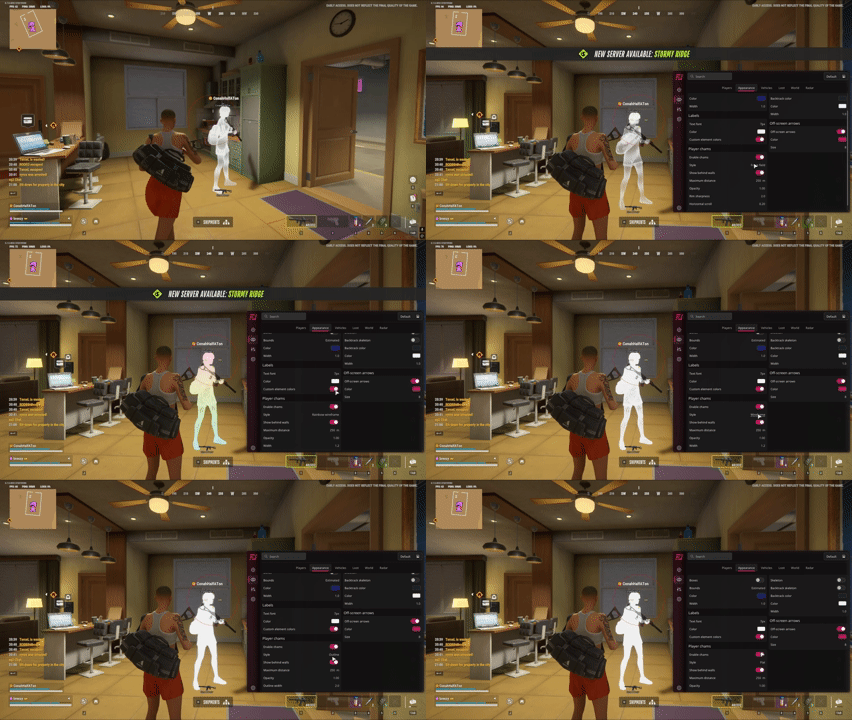
Player Chams
- Enable chams Draws a coloured overlay on player models
- Style How chams are drawn, e.g. Flat
- Show behind walls Shows chams through walls
- Maximum distance Chams are only drawn within this range
- Opacity How see-through the chams are
Off-screen Arrows
- Off-screen arrows Arrows pointing to players outside your view
- Size Size of the arrows
Visuals: Vehicles
Vehicles
- Vehicles Turns vehicle ESP on or off
- Cars Shows cars
- Helicopters Shows helicopters
- Maximum distance Vehicles further away than this aren't drawn
- Details Shows extra vehicle information
- Occupant names Shows who is inside each vehicle
Appearance
- Color Colour of vehicle ESP
- Dots Marks each vehicle with a dot
- Dot size Size of the dots
- Labels near crosshair Only shows labels for vehicles near your crosshair
- Label FOV How close to the crosshair a vehicle must be to get a label
- Show label FOV Draws the label FOV area on screen
- Avoid overlapping labels Spaces labels out so they don't overlap
Filters
- Occupied only Only shows vehicles with someone inside
- Unowned only Only shows vehicles nobody owns
- Accessible vehicles only Only shows vehicles you can use
- Hide vehicle being driven Hides the vehicle you're driving
Relationships
- Highlight accessible vehicles Highlights vehicles you can use
- Highlight police vehicles Highlights police vehicles
Visuals: World
Environment
- Doors Shows doors
- Hiding places Shows hiding spots
- Fences Shows fences
- Exits Shows exits
- Observed impacts Marks bullet impacts you've seen
- Maximum distance World objects further away than this aren't drawn
Raid State ESP
- Raid state ESP Shows the raid status of buildings
Shot Tracers
- Shot tracers Draws the path of shots
- Lifetime How long each tracer stays on screen
- Width Thickness of the tracers
- Glow Strength of the tracer glow
Visuals: Radar
Radar
- Radar Turns the radar on or off
- Maximum distance World distance the radar covers
- Players Shows players on the radar
- Vehicles Shows vehicles on the radar
Loot
- Loot Shows loot on the radar
- Hide empty Hides containers that have been emptied
- Rarities Which rarities are shown
- Containers Shows containers
- Dropped loot Shows dropped items
- Vehicle loot Shows loot inside vehicles
- Random loot Shows random loot spawns
- Resource nodes Shows resource nodes
- Player count Shows how many players are nearby
Floating Radar
- Shape Shape of the floating radar, e.g. Circle
- Orientation Which way the radar faces, e.g. Camera up
- Local indicator How you're shown on the radar, e.g. a direction arrow
- Accent Accent colour of the radar
Value Filter
- Minimum item value Hides loot worth less than this
- Hide unknown value Hides loot whose value isn't known
Tweaks
Camera
- Camera FOV override Replaces the game's field of view
- Vertical field of view The field of view to use
Free Camera
- Free camera Detaches the camera so you can look around freely; F6, T toggles it
- Camera speed How fast the free camera moves
- Look sensitivity Mouse sensitivity in free camera
Sky
- Sky Replaces the game's sky colour
Lighting
- Sun boost Makes sunlight stronger
- Intensity multiplier How much stronger the sunlight gets
- Sun glow Adds a glow to the sun
- Intensity Strength of the sun glow
Fog
- Fog Replaces the game's fog
- Density How thick the fog is
- Start distance How far away the fog begins
Settings
Appearance
- Interface scale Size of the menu
- Background dim How much the game is darkened behind the menu
Application
- Language Menu language
Window
- Open menu Key that opens the menu, e.g. Delete
Light setup
- Windows 10/11
Reviews
No reviews yet. Verified buyers can be the first to leave one.
Write a review
Reviews are open to confirmed buyers, one per purchase, from the device the order was placed on. No account needed.